Cybersecurity News
Mostrando entradas con la etiqueta microsoft. Mostrar todas las entradas

Descifrando DDs de discos cifrados con Bitlocker durante un análisis forense digital


Hola a todos. Al hilo del artículo sobre análisis de intrusiones vía Team Viewer que compartí recientemente en Flu Project, me consultaba un compañero de sector sobre como abordar aquellos casos forenses en los que nos encontrábamos con un disco cifrado con Bitlocker. En estos casos es cierto que el procesado de un clonado dd no es inmediato, y tecnologías como Autopsy no aceptan, al menos sin scripts o plugins, el descifrado de estos discos, por lo que se hace necesario realizar un descifrado previo antes de poder pasárselo a una herramienta de análisis. Por suerte, ya existen herramientas que podemos utilizar, y una de las más usadas es bdemount.

De bdemount no hay mucho que contar. Como su propia descripción indica, mounts a BitLocker Drive Encryption (BDE) encrypted volume. Lo que sí necesitaremos conocer de antemano es, obviamente, la contraseña, y, a continuación, el offset donde comienza la partición. Hay vías para obtener la clave de bitlocker a partir de un dump de memoria con alguna herramienta como Volatility, pero eso lo dejaré para posteriores artículos.

Una vez clonado el disco del forense en formato dd, podremos listar su contenido mediante fdisk -l (el que esté o no cifrado no impide el clonado, por lo que hasta este punto no deberíamos tener mayores inconvenientes): 


Es posible que el disco contenga varias particiones, y la que os interese sea una en concreto, la cifrada. Esto lo podréis averiguar con el propio Autopsy o FTK Imager de forma visual:


O si sois más consoleros, con Hexdump:


Para saber si una partición se encuentra cifrada con Bitlocker podréis mirar los primeros bytes y os encontraréis con la siguiente cadena: "-FVE-FS-". Os dejo con un enlace muy interesante donde se dan muchos detalles técnicos acerca del cifrado de Bitlocker:

https://forensicswiki.xyz/wiki/index.php?title=BitLocker_Disk_Encryption

Con la partición de interés identificada, solo restará montarla de forma descifrada. Para ello, os dejo a continuación los parámetros a utilizar:

sudo bdemount -pCONTRASEÑA -o $((512*OFFSET)) clonadoforense.dd /media/destino

Recordad tener previamente una carpeta con permisos de escritura en destino. 


Ahora podréis trabajar con ella como consideréis. Podréis hacer otro dd de la partición descifrada, podréis analizarla desde, por ejemplo, la versión de Autopsy para Linux, podréis extraer archivos concretos como, por ejemplo, los logs de acceso a determinada aplicación, etc. etc.

Además de bdemount, también podréis utilizar otras herramientas como Dislocker para descifrar una partición cifrada con Bitlocker. Dislocker está disponible entre las herramientas de Kali. Os dejo con un post interesante de Stefan Rows, donde no solo explica como instalar y utilizar Dislocker, sino que también detalla como preparar un script de automontaje:

https://www.ceos3c.com/linux/open-bitlocker-drive-linux/

Finalmente, y por aportaros algo más de lectura sobre descifrado de Bitlocker para esta semana, quería dejaros por aquí un hilo de Twitter con el que me topé gracias a DragonJAR:


Una joya de hilo de Jon Aubrey, en el que muestra como logró descifrar precisamente, con Dislocker, un portátil cifrado, extrayendo la clave a nivel de hardware con un analizador de Saleae:


Con este hilo tendréis lectura para cacharrear un buen rato con algún portátil que tengáis a mano :)

Espero que haya sido de vuestro interés.

¡Saludos!
Digital Forensics of emails in Microsoft Office 365

Context

The advancement of the cloud and the automation of processes in companies are leading Microsoft Office 365 to spread unstoppably, replacing traditional installations of Exchange that required greater maintenance and control. However, the cloud brings changes, and we have to adapt to a host of new settings, new ways to do things and new licensing modes. 

From a forensic point of view, experts had different options to present an expert opinion attesting to the existence of certain emails within a mailbox. Among other outstanding options —and according to the principle of always "cloning" the largest container—, we could access Exchange to export the user's mailbox, we could clone the mail server itself, or even, the hard disk of the user's own PC from which then the PST would be extracted. However, this is changing. Servers are now in an external provider: Microsoft (as was already the case if we had contracted a hosting in SaaS mode), and users are getting used to using Office 365 from their browser. Under these circumstances, how could we clone an email inbox while fully guaranteeing forensic integrity? Keep reading to find out! 

Introduction

In Zerolynx we carry out forensic expert reports every month, mainly derived from clients who call us after having suffered a CEO Scam, with the aim of, on the one hand, analysing the security breach that has led to the interception of the mail to try to tackle the issue, and, on the other hand, to facilitate the prosecution of the case and the potential recovery of the money. But we will talk about these cases in another article, today we want to focus only on Office 365. 

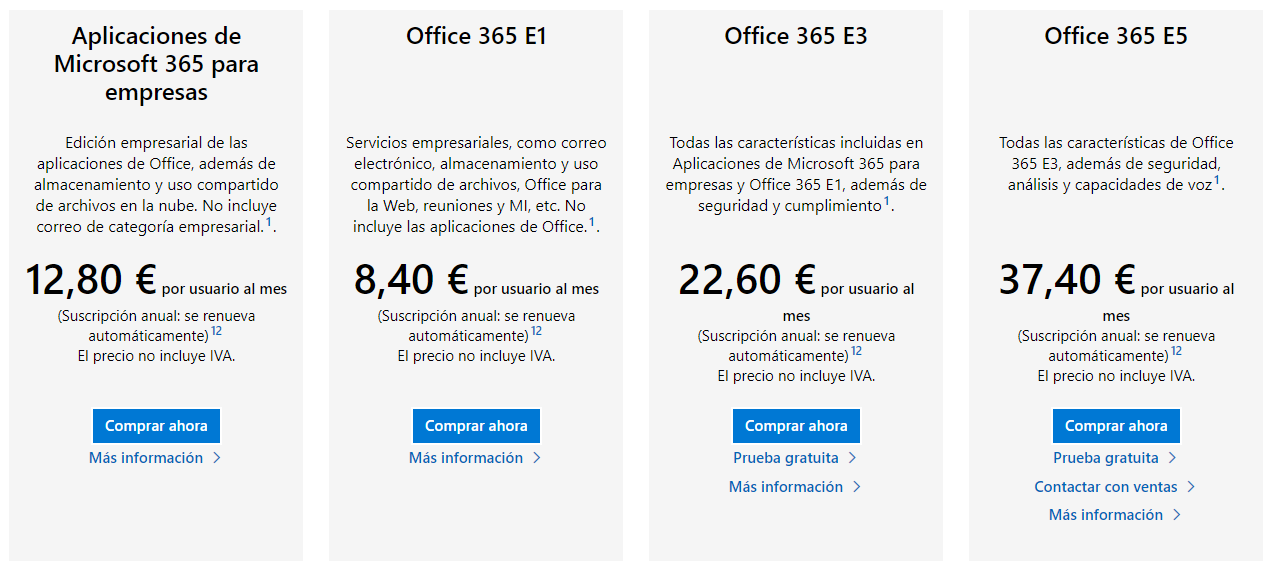
The first thing we need to know is that Microsoft has different licensing modes, depending on the number of tools and functionalities included. Advanced security is only included in the E5 suite. Please, keep this in mind, because later we will return to this detail.


Most of the companies that work with Office 365 have E1 or E3 suites, which usually cover almost all the needs of organizations. 

Problem

When Zerolynx started performing forensics in Office 365, we kept working as usual, cloning the computers of the users where their mailboxes were synchronized (within the Outlook client), but then we came up with a forensic case where this was not possible. Omitting the complexity of the case, which does not provide any further detail to contextualize the article itself, we referred to the Office 365 compliance centre with a user with the corresponding privileges provided by the client. Our aim was to access, freeze the mailbox to have a full and unalterable copy that guaranteed that we would always get the same hash signature, and download it. 

Below, we briefly show the mailbox downloading process, widely documented in multiple articles on the Internet. .


Mailbox selection


Details of results


Exporting information


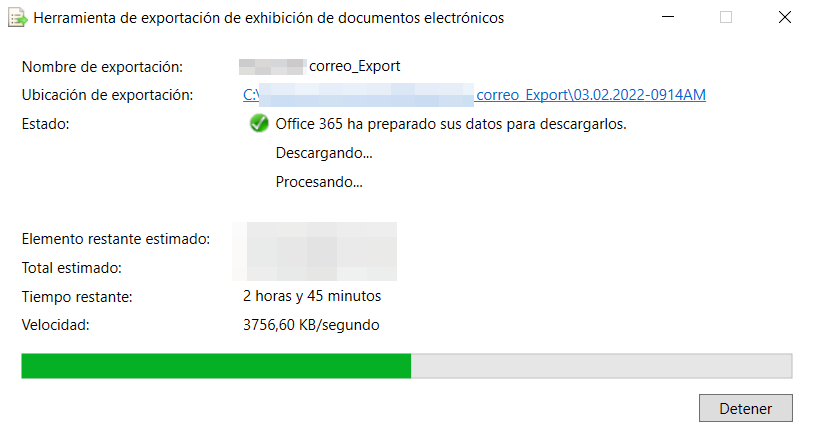
Downloading the results


Once the PST was downloaded, we then signed the file, obtaining the corresponding SHA256 hash. And, as a regular habit in forensics to ensure integrity, and as a good habit, we downloaded it again and re-signed it to verify that the process was working correctly, so that, in case of issuing a second report, the future extraction would be identical to the current one. To our surprise, despite having the mailbox apparently immobilized, the hash did not match. What was happening? Although we were more or less clear about what was going on, we opened a case with Microsoft, and we took the opportunity to discuss the issue in parallel with other MVPs who, like us, are regularly dealing with these technologies. A few days later we got the following answer:


Yes indeed, contrary to what you might think, Microsoft modifies the files in real time during each download, adding certain bytes that alter their content, and, therefore, their hash. Thus, it is not possible to download an entire mailbox while maintaining its integrity. 

Under these circumstances and with some lateral thinking, the situation could still be justified in the expert report: the technological problem was reported, and, irremediably, the "msg" was extracted from the mail to be ratified itself, signing (even if it were the latter) in order to evidence that the same hash would be obtained if extracted in a future download. But, once again we got a surprise: the msg were not whole either, and they also included certain new bytes with each download.  

Hence, there was only one solution left, and it is the one that Microsoft gives as a response: acquire a E5 license, which, with the Advanced eDiscovery option, does allow to generate an "online" hash and guarantee said hash during downloads. 

Formerly, the companies specialising in forensics were the ones who had to acquire the necessary tools to perform cloning and analysis, but, with the new approach to the cloud, everything is oriented to customers who now have to buy these tools and give us investigators access so we can work. 

Here follow some of the screenshots of the process so that you can see how the hash would be generated with an E5 license.


Access to Advanced eDiscovery


Case creation


Subsequently, a suspension of the mail account would be created to preserve the contents of the mailbox in its entirety.


 Suspension of mail account


Selected Account Suspension Detail and Date Filters

A custodian would then be assigned to the case:


Custodian Assignment


Later, a collection would be created, that is, the complete content of the mailbox to be downloaded would be selected:


Collection Detail

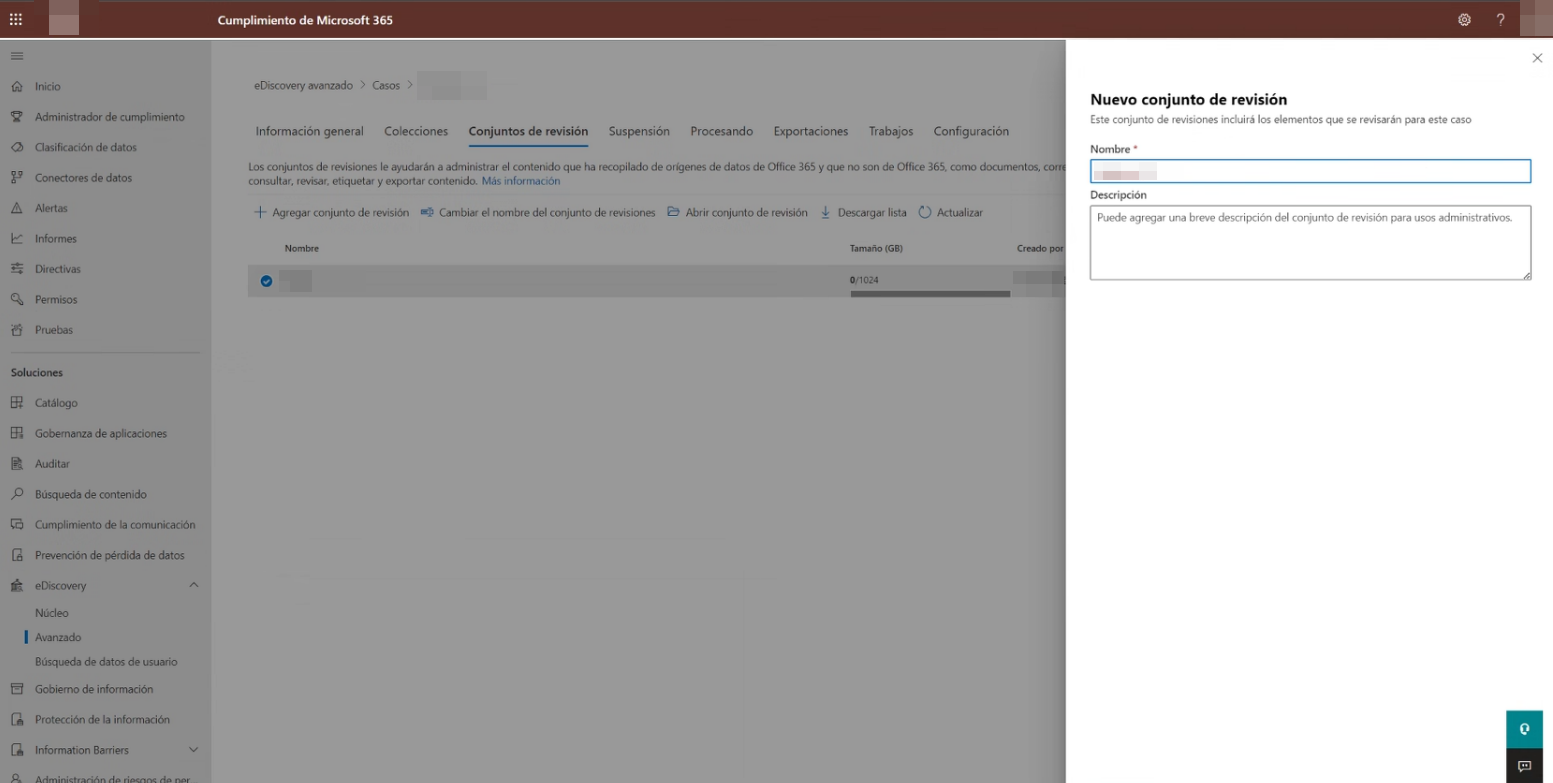
At this point, a review set would be created that would be assigned to the previously defined collection:


Creation of Review Set 


Assignment of Review Set to Collection 

And finally, the forensic export file would be generated:


Exporting information 


Once the export has been generated, it would be downloaded.


Downloading the results


Once downloaded, it maintains its integrity and, therefore, guarantees its hash over time.

Conclusion

The most important thing in an expert report is to be clear, to be sure and conclude without a doubt that our premises are the right ones. It is true that the inalterability of the content of an evidence can be guaranteed even if its hash signature is modified. But if we can avoid it, in this case, by contracting a new license, we will save explanations and questions during ratification in court. Therefore, before starting an Office 365 forensic analysis, make sure that your client has an E5 license you have access to, or, otherwise, the issue may cause you some major headaches.

Juan Antonio Calles, Microsoft MVP 2021-2022


Recientemente, Microsoft ha renovado como Most Valuable Proffesional (MVP) a nuestro compañero Juan Antonio Calles, CEO de Zerolynx. Este galardón, otorgado a los expertos tecnológicos más destacados del mundo, pretende agradecer, y reconocer las contribuciones realizadas en sus comunidades técnicas, importantes tractoras del impulso e innovación del mercado. 

El reconocimiento otorgado a Juan Antonio se centra sobre la categoría de Azure, la tecnología Cloud del fabricante con sede en Redmond. Desde Zerolynx disponemos de un potente equipo formado para ayudar a nuestros clientes a fortificar sus infraestructuras Cloud, con personal técnico capacitado en las principales tecnologías del mercado.


Sobre los reconocimientos Microsoft MVP

Los MVP son aquellos profesionales cuya pasión por la tecnología, conocimientos técnicos y espíritu comunitario, puestos al servicio de los usuarios, sirven de ayuda frente a los diversos problemas técnicos del día a día. Para su nombramiento es necesario ser nominado por un actual MVP de Microsoft, quien debe conocer no solo a la persona sino, también, su influencia e impacto ejercidos sobre el colectivo. A continuación, se analizan 3 aspectos fundamentales del nominado, quien debe ser un experto en la materia, un apasionado de lo que hace y, sobre todo, que se esté haciendo notar ¿Y qué significa esto? Quiere decir: tener talento para los blogs, ser líder en alguna comunidad técnica relevante, disponer de un buen manejo de las redes sociales, ser colaborador destacado en GitHub o StackOverflow; y, sobre todo, ser capaz de compartir su pasión por la tecnología de manera diferente y genuina

Entre las principales ventajas que disfrutan los MVP, se encuentran el acceso anticipado a productos de Microsoft, una invitación para Global MVP Summit, evento anual exclusivo que se celebra en su sede central de Redmond; una suscripción de Office 365 y acceso a canales de comunicación directa que facilitan y estrechan la relación con el resto de MVP´s del mundo, ofreciendo una mejor atención a las necesidades de sus ecosistemas locales. 

Para más información, os dejamos el enlace al Programa MVP de Microsoft.

Juan Antonio Calles, Microsoft MVP 2020-2021


El pasado 2 de junio, Juan Antonio Calles, CEO de Zerolynx Group, y CSO de Osane Consulting, la compañía del grupo especializada en seguridad patrimonial, fue galardonado con el premio Most Valuable Proffesional (MVP) de Microsoft. Este galardón, otorgado a los expertos tecnológicos más destacados del mundo, pretende agradecer, homenajear y reconocer las contribuciones realizadas en sus comunidades técnicas, que resultan imprescindibles para la resolución de las cuestiones  planteadas y, además, guardan estrecha relación con  los productos y servicios de la marca americana. Su papel como owner e impulsor del proyecto Open Mobility Security Project (OMSP); ponente habitual en diversos foros y congresos de seguridad, coorganizador de las Jornadas X1RedMasSegura; y, por último, y aunque no menos importante, cofundador y blogger habitual de Flu-Project.com; han sido elementos clave en su nombramiento. 


Premio Most Valuable Professional de Juan A. Calles García

Los MVP son aquellos profesionales cuya pasión por la tecnología, conocimientos técnicos y espíritu comunitario, puestos al servicio de los usuarios, sirven de ayuda frente a los diversos problemas técnicos del día a día. Para su nombramiento es necesario ser nominado por un actual MVP de Microsoft, quien debe conocer no solo a la persona sino, también, su influencia e impacto ejercidos sobre el colectivo. A continuación, se analizan 3 aspectos fundamentales del nominado, quien debe ser un experto en la materia, un apasionado de lo que hace y, sobre todo, que se esté haciendo notar ¿Y qué significa esto? Quiere decir: tener talento para los blogs, ser líder en alguna comunidad técnica relevante, disponer de un buen manejo de las redes sociales, ser colaborador destacado en GitHub o StackOverflow; y, sobre todo, ser capaz de compartir su pasión por la tecnología de manera diferente y genuina

Entre las principales ventajas que disfrutan los MVP, se encuentran el acceso anticipado a productos de Microsoft, una invitación para Global MVP Summit, evento anual exclusivo que se celebra en su sede central de Redmond; una suscripción de Office 365 y acceso a canales de comunicación directa que facilitan y estrechan la relación con el resto de MVP´s del mundo, ofreciendo una mejor atención a las necesidades de sus ecosistemas locales. 

Para más información, os dejamos el enlace al Programa MVP de Microsoft.